
Most of the people I talk to about AI are using Claude or ChatGPT, not Microsoft.
They reach for those first, they've gotten good at them, and when Microsoft's tools come up, the reaction is some version of a shrug. The ones who are on Microsoft are usually there because it's company policy, not preference — and they're using Copilot as a glorified search box. It's the weaker option. And what is Copilot Studio — isn't that just Copilot with a different name?
Those reactions make sense, because Microsoft has shipped a lot in a short window and hasn't made the pieces easy to tell apart. Consider the questions I've been hearing lately. Is Cowork the same as Copilot, or something separate? If Cowork just does the work for me, why would I ever touch Copilot Studio? Is Studio the thing I use to build a chatbot, or to automate a process — or both? And what are Scout and Agent 365, and do I need to care yet?
Copilot Cowork went generally available worldwide on June 16. Copilot Studio keeps growing. There's a row of newer names lining up behind them. The tools are capable and they're distinct — but they're easy to confuse with each other, and the confusion has a cost. You can overspend, overbuild, or decide the whole category is hype and miss what your Microsoft license already does.
There's a question that helps sort it out.
A better question than "which one is best"
"Which Microsoft AI tool is best" doesn't really have an answer, because the tools aren't doing the same thing. The question that sorts them is: what's the job?
Almost everything in the Microsoft stack does one of three jobs.
Help me do something. This is Microsoft 365 Copilot — the assistant inside Word, Excel, Outlook, and Teams. You're in the document; it helps you draft, summarize, analyze. You stay in the driver's seat the whole time. This is the layer most people already have, and the one most people mean when they say "Copilot."
Go do something for me. This is Copilot Cowork. You hand it a multi-step job — pull these sources together, build the deck, draft the competitor analysis — and it works in the background and brings back a finished deliverable instead of a suggestion. You're delegating, not collaborating turn by turn. Microsoft describes it as built for complex, long-running, multi-tool tasks, and it became generally available in June.
Run something for us. This is Copilot Studio. Here you're not asking for a deliverable. You're standing up a capability that operates on its own — connected to your systems, running a process, used by people other than you.
Help me. Do it for me. Run it for us. That's the map. Most of the confusion in the market comes from treating those three as one thing, or from arguing about which is "best" when they aren't even doing the same job.
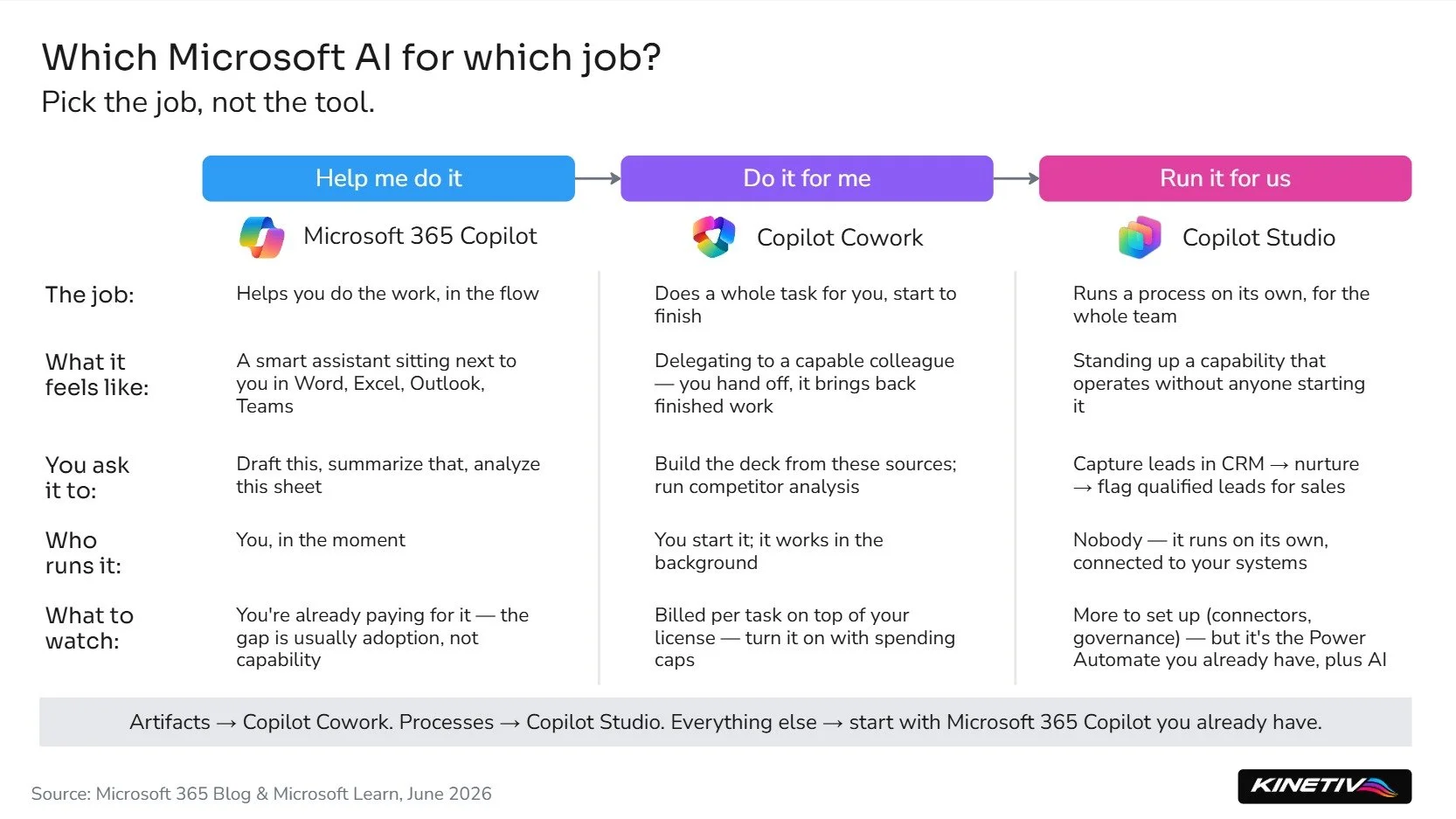
The three jobs Microsoft's AI tools actually do — and how to tell which one you need.
The three feel similar from a distance and behave nothing alike up close. The place that trips people up most is the line between the second and the third.
When to use Copilot Cowork, and when to use Copilot Studio
Someone asked me recently why anyone would bother with Copilot Studio when Copilot Cowork is right there and easier. It's a fair question. Cowork needs no real understanding of how systems connect — you describe what you want and it does it. Studio asks you to think about connectors, triggers, and governance. So when is the extra effort the right call?
Start with a job Copilot Cowork is genuinely good at. You need an executive presentation built. You ask Cowork to assemble it from your recent files, draft the talk track, and — because you'd rather your leadership react on their own time than sit through a meeting — package it into something they can review asynchronously. Cowork can do that in one pass: finished work, no coordination overhead. Building that as a Copilot Studio agent would be carpentry to hang a picture.
Look at the shape of that job. A person decides to start it, judges what comes back, and sends it. It produces an artifact — a presentation, a one-time thing. Making another one next month produces a new artifact, not a standing process. A human sits at both ends of every run.
A different job has a different shape. For our own website assistant, we needed to capture a marketing lead on the site, write it to the CRM, run an email sequence that nurtures that lead over days, and surface the ones that look sales-ready to a human rep. That runs on Copilot Studio. Nobody starts that job each morning — it runs on its own, connecting systems that don't naturally talk to each other, holding state across days, operating whether anyone is watching. That isn't a deliverable you request. It's a process you put on autopilot.
So the difference isn't really "easy versus technical." Copilot Cowork produces artifacts. Copilot Studio operates processes. Put it this way: if your lead engine needs a person to kick it off every time, it's really just a task on someone's list — not a process running on its own.
I'll admit I had to work this one out for myself, because the easy assumption is that Cowork can do it all. Can it run a repeatable business process — one that connects systems, data, and people to operate part of your day-to-day? After digging into how it works and building the alternative in Studio, my answer is no. Not because Cowork is underpowered. Because it's built for something else. It can save and schedule a workflow, so it'll produce your Monday status summary on a recurring basis — but that's a personal automation reaching your own files. The moment the job has to connect to outside systems, run without you starting it, and serve a team that depends on it, you've crossed into Studio's territory.
Copilot Cowork handles your repeatable task. Copilot Studio runs the team's operating process.
And Copilot Studio is more familiar than it sounds. If you've used Power Automate, you've already met most of it — Studio is essentially Power Automate's workflow engine with a generative AI layer on top, connecting to systems inside and outside Microsoft. For a lot of buyers, that's the reassuring part: it's plumbing you may already own.
Two things to know before you turn anything on
Both come straight from how the products are built and priced.
The first will show up on an invoice. Copilot Cowork doesn't bill like the rest of Copilot. Your Microsoft 365 Copilot license is a flat $30 per user per month — Cowork charges again, on top of that, every time it runs a task. Microsoft meters it in a usage currency called Copilot Credits, a cent apiece, and the per-task cost depends on how heavy the job is: the model it uses, how much context it pulls in, how many tools it calls, how long it runs. A quick task costs pennies. A big one can run several dollars. The good news: Cowork ships off by default, with admin spending limits and alerts at the tenant, group, and user level — so the cost is controllable, as long as someone sets the controls before usage ramps rather than after.
The second is adoption. A lot of Copilot spend gets wasted simply because people are given licenses and never build the habit of using them. That's not a problem with the tool or its price — it's that getting people to actually change how they work takes deliberate effort, and that effort is easy to underestimate.
The names you can set aside for now
You'll also hear about Scout, Solara, Microsoft Foundry, Work IQ, and Agent 365. They're real, but for a company of 100 to 1,000 people, most aren't this year's decision. Scout is an early preview, Solara is pilot-stage hardware, and Work IQ is a grounding layer beneath the products rather than something you buy. Foundry is for code-first teams building custom agents from scratch — further than most mid-market companies need to go. Agent 365 governs whole fleets of agents, which matters once you're running several, not when you're choosing your first.
It's enough to know they exist.
Where to start
If you're looking at a handful of product names, a new pricing model, and a quiet worry that you're already behind — here's what I'd tell you.
Don't start with the tool. Start with the problem.
Pick one real use case that matters to your business. For that one problem, work out which job you're doing — help me, do it for me, or run it for us — and let that pick the tool. Build a small version. Test it with the people who'd actually use it. See what you learn. Then pick the next problem.
A lot of the energy right now is going to that third job — getting AI to run real operational work, not just assist with it. It's worth taking seriously. It's also worth starting small and proving before you scale. You don't need the whole map to take the first step. You need one problem worth solving and the willingness to try.
Start there.
Sources
Microsoft 365 Blog, "Copilot Cowork is now generally available," June 16, 2026 — GA date; two-layer pricing (Microsoft 365 Copilot license + Copilot Credits at $0.01/credit pay-as-you-go); per-task cost from four inputs (model, context, tools, runtime); light/medium/heavy task patterns; off-by-default and admin spending controls (tenant/group/user); Frontier grace period to July 1, 2026; Anthropic Opus 4.8 / Sonnet 4.6 at GA.
Microsoft 365 Copilot pricing page — $30/user/month Microsoft 365 Copilot license.
Microsoft Learn, "Agent flows and workflows overview" (Copilot Studio) — converting a Power Automate cloud flow into a Copilot Studio agent flow.
Microsoft Learn, "Use connectors in Copilot Studio agents" — connectors wrap APIs to Microsoft and non-Microsoft services (Office 365, SharePoint, Dynamics 365, Salesforce, and more).
Microsoft Learn, "Build an autonomous agent in Copilot Studio" — autonomous agents, triggers, long-running process automation.
Scout, Work IQ, Agent 365 — Microsoft Learn / Microsoft 365 Copilot materials.