
In August, I cracked open my second laptop and set it off to one side of my desk. My main work stayed on my main screens, with Claude, my preferred AI tool. The second laptop was for a test-run with ChatGPT's Codex and a job I'd done by hand in Excel for more than three years, a personal finance system.
I started it the way I start any AI session. I said what I wanted, pointed it to my reference files and my work tracker, and asked it to research the topic. Within a few turns, it had a work plan. Every 5 to 10 minutes, I glanced over to answer a question or approve a step. Within a couple of hours, it was building out the whole system with automated data collection and a custom dashboard.
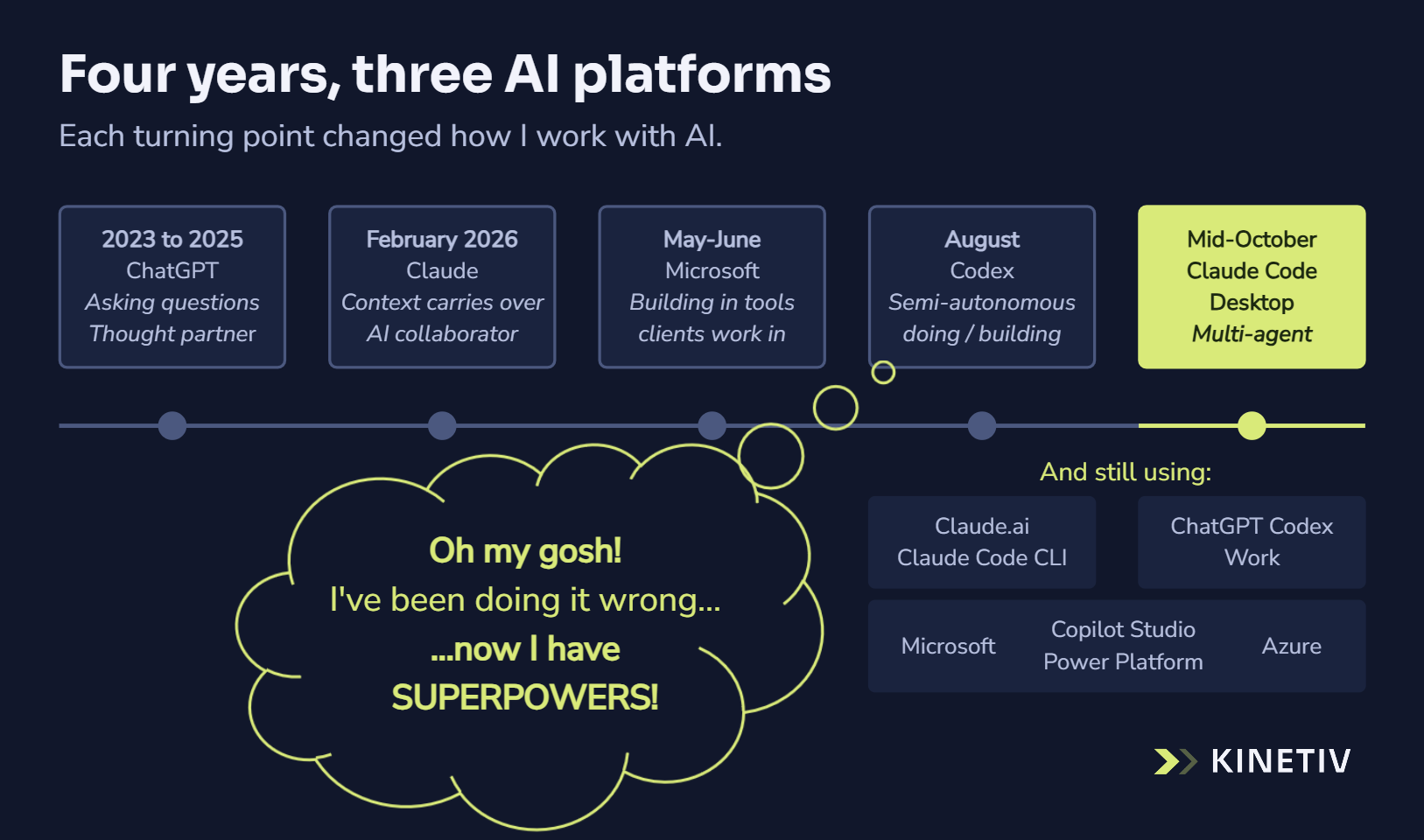
My first thought was, "Oh my gosh, I've been doing it wrong." My second was, "Now I have superpowers!"
Pick a home base. Don't be afraid to try the others.
Three years of asking
ChatGPT went public in November 2022, and like most people, I knew very little about AI before early 2023. For the next few years, I used it the way most knowledge workers did: to search, ask questions, draft, research and think things through. Prompt engineering was the skill everyone talked about in those early days.
Early this year, I noticed the tools could do a lot more than answer.
Claude: from asking to collaborating
Around February, I installed Claude's desktop app, and right out of the gate I could see the difference. Connected to my files and tools, and organized in projects, it carried context from one conversation to the next. I could get the work out of my head and stop starting from scratch every session. Claude became my main tool for work, and ChatGPT stayed my go-to for general questions.
Microsoft: building where clients work
Around May, I started getting ready to launch Kinetiv as a Microsoft 365 Copilot specialist. For the next few months, I was deep in Microsoft's builder tools, starting with Copilot Studio. They're solid, they connect to almost anything, and releasing a Copilot Studio agent straight into the Copilot many teams already use is simple. For organizations already on Microsoft 365, that's where their people work, and Microsoft's data protection is a big reason they choose it. (In July, I wrote about which Microsoft AI fits which job.)
Letting go
Which brings me back to that second laptop. Until August, I'd kept AI close: one session, one project at a time, with me steering every step. Watching Codex plan and build on its own showed me that my habit of staying in control was what had been holding me back. With the right context and a shared plan for the work, I could have AI working on several complex projects at once. That's where the superpowers came from.
So I brought that way of working to my main work. In mid-October, I moved to Claude Code on the desktop, where I now run several sessions at once, and set up one shared way for my AI tools to keep track of context and work. After a couple of weeks running Claude Code and Codex side by side, I found I work best when the work stays small and visible, and I always know what's in progress and when I'm needed. That's how Claude Code works with me, and it became my home base.
By my own estimate, it has doubled or tripled what I can do in a week, just since mid-October. Relaunching our website and rebuilding our Ask Kinetiv assistant took under two weeks. The originals took six weeks or more. (And this time I was working on a fair amount of client work at the same time.)
I still keep Codex open and up to date. These tools change month to month, and what fits me today may not fit in six months. When a client works in ChatGPT, that's where I'll meet them.
What I was doing wrong
For three years, I treated AI as something to ask. Then I treated it as something to steer, one step and one task at a time. What held me back was my habit of staying in control. The superpowers came when I gave AI the context and a plan, and let it run.
Four years in, I'm also convinced nobody ends up on just one AI platform. Most people have a favorite. Teams settle on a default, often a different one. Organizations end up running several, wired into the rest of their tools.
So pick a home base, and don't be afraid to try the others. Give one real piece of work to a tool you don't usually use, and let it run a little further than feels comfortable. You might just find your own superpowers.
That's how we work with clients, too. We start with what you already have and add the right tool where it fits. If you're wondering which tool fits a piece of your work, ask Kinetiv.