
Kinetiv helps companies figure out where AI can make the biggest difference. So we asked ourselves the same question about our manual assessment process — and made it free for anyone to run, in a few minutes.
The situation
We wanted to give companies something genuinely useful, for free.
The catch is that the useful thing — a read on where AI fits your business and where to start — normally takes senior time and costs real money. That puts it out of reach for a lot of the companies who need it most: the ones stuck between "we should be doing something with AI" and "no idea where to start, or whether it's worth it."
AI has gotten good enough to change that. We took the first part of the assessment we run by hand — the part that helps you understand where to start — and made it self-service. The deeper, people-led work still exists if you want it. But the first read, the one that helps you get unstuck, is now something anyone can get in a few minutes.
The approach
We started where every Kinetiv engagement starts: by deciding what the thing had to do before building it.
The assessment isn't trying to fix anything. It answers one question — where should you get started with AI? — and the output needed to be specific enough to be useful, clear enough to discuss with your team, and focused enough to help you decide where to look first. Free, in a few minutes, no call required.
Underneath, it uses the same basic lens we use in the fuller assessment. It rates each area of your business on three things, kept deliberately distinct:
How much does this work hold you back today?
How much would improving it matter?
How ready are you to act on it?
The first two together define the size of the prize. Readiness stays separate — and gets its own axis.
The assessment
The AI Opportunity Assessment is live on our site today. You answer a set of questions about the parts of the business you own, and a few minutes later a personalized report lands in your inbox. It scores your opportunities, maps them, and points to where to start. No call required.
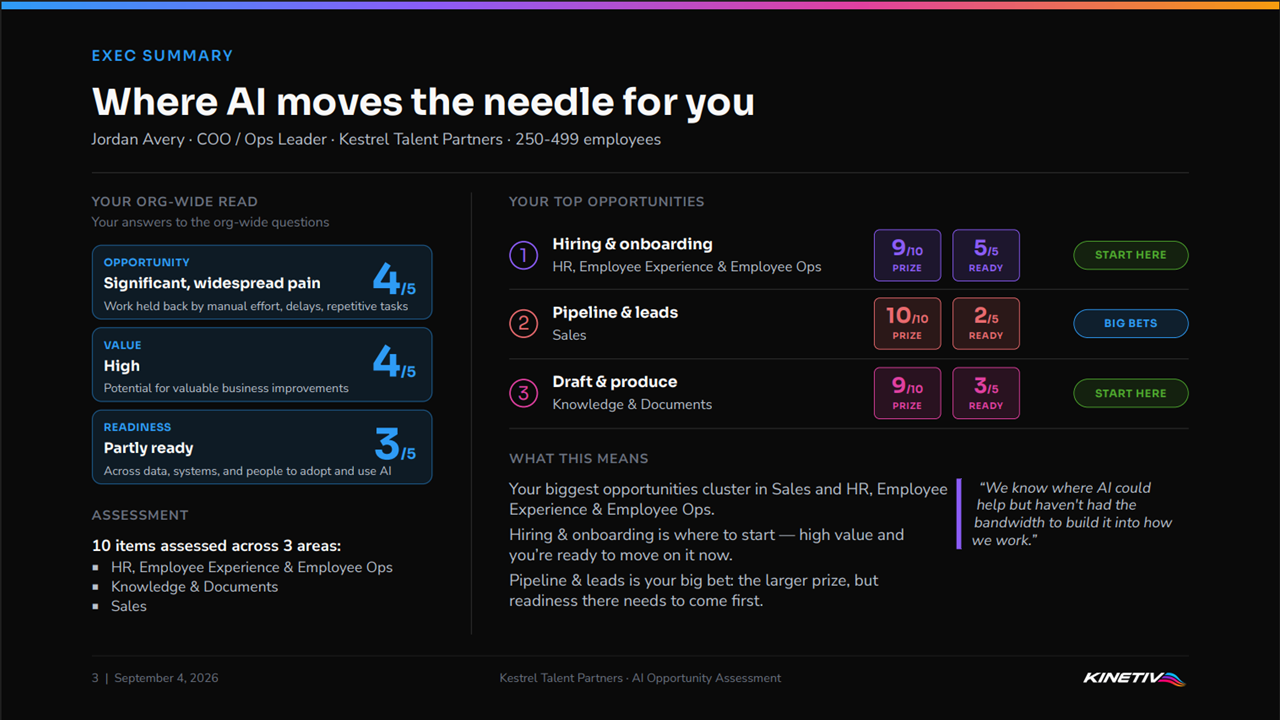
Real AI Opportunity Assessment report output, shown on an illustrative example company (a mid-market staffing firm).
It's a first version — real, live, and working, but still a starting point. We built it because we wanted to see how people actually use it, what helps, and what doesn't.
So run it and tell us how it went: what was useful, what missed, what you wish it had asked. We're still improving it, and that feedback will shape what comes next.
The thinking
Here's the idea worth keeping even if you never talk to us.
Readiness is the wrong thing to lead with. Plenty of companies ask "are we AI-ready?" and treat the answer as a gate — get the whole organization ready first, then act.
But you don't need company-wide readiness to start. AI has matured enough that most teams can start somewhere useful right now: pick a real opportunity, start small, see what works, adjust, and go again.
You don't have to wait until you're ready.
That's why the report maps the size of the prize against your readiness, instead of handing back one readiness score.
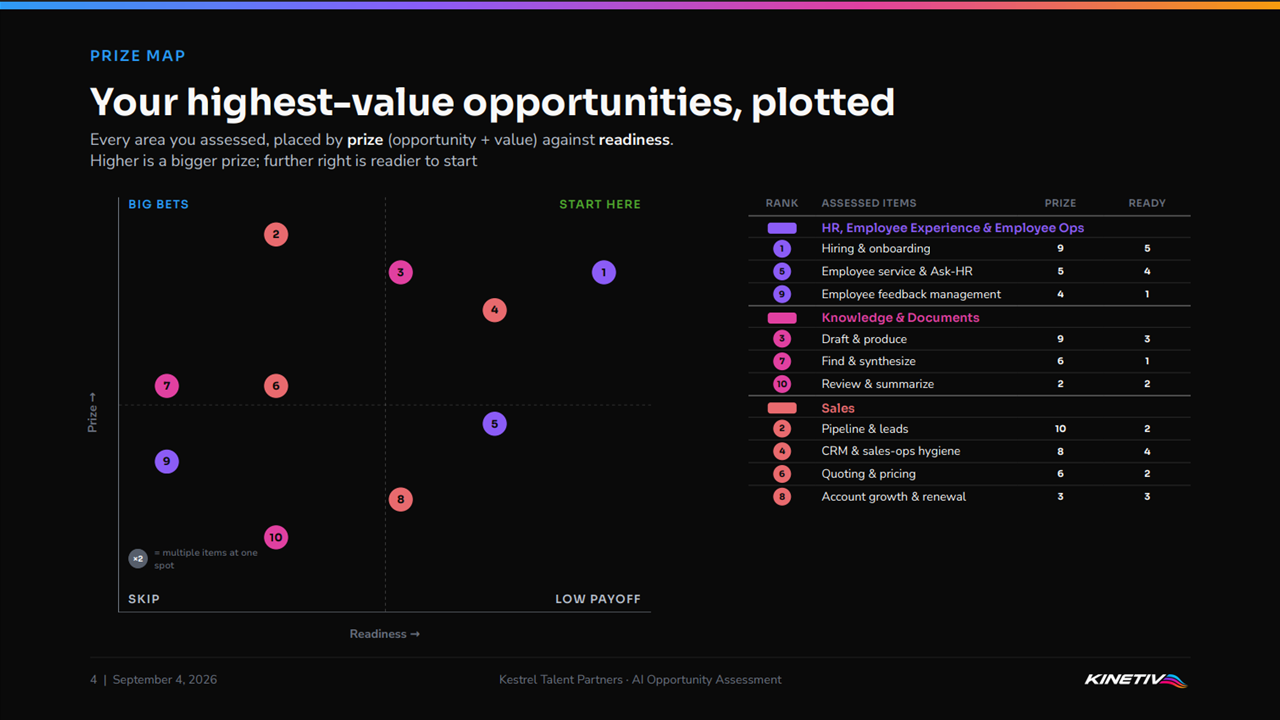
Real AI Opportunity Assessment report output on an illustrative example company. The size of the prize on one axis, readiness on the other — the big bets to build toward, and where to start now.
The map separates the bigger bets you may need to build toward from the opportunities you can start on now. Readiness changes when you go after an opportunity, not what it's worth. A high-value opportunity you're not ready for is still high-value — it's something to sequence, not drop.
Start with a worthwhile opportunity you can act on now, learn from it, then take on the bigger bets with more experience.
How we built it
We're a Microsoft partner, but not every piece has to be a Microsoft tool. We used the tool that fit each part of the job.
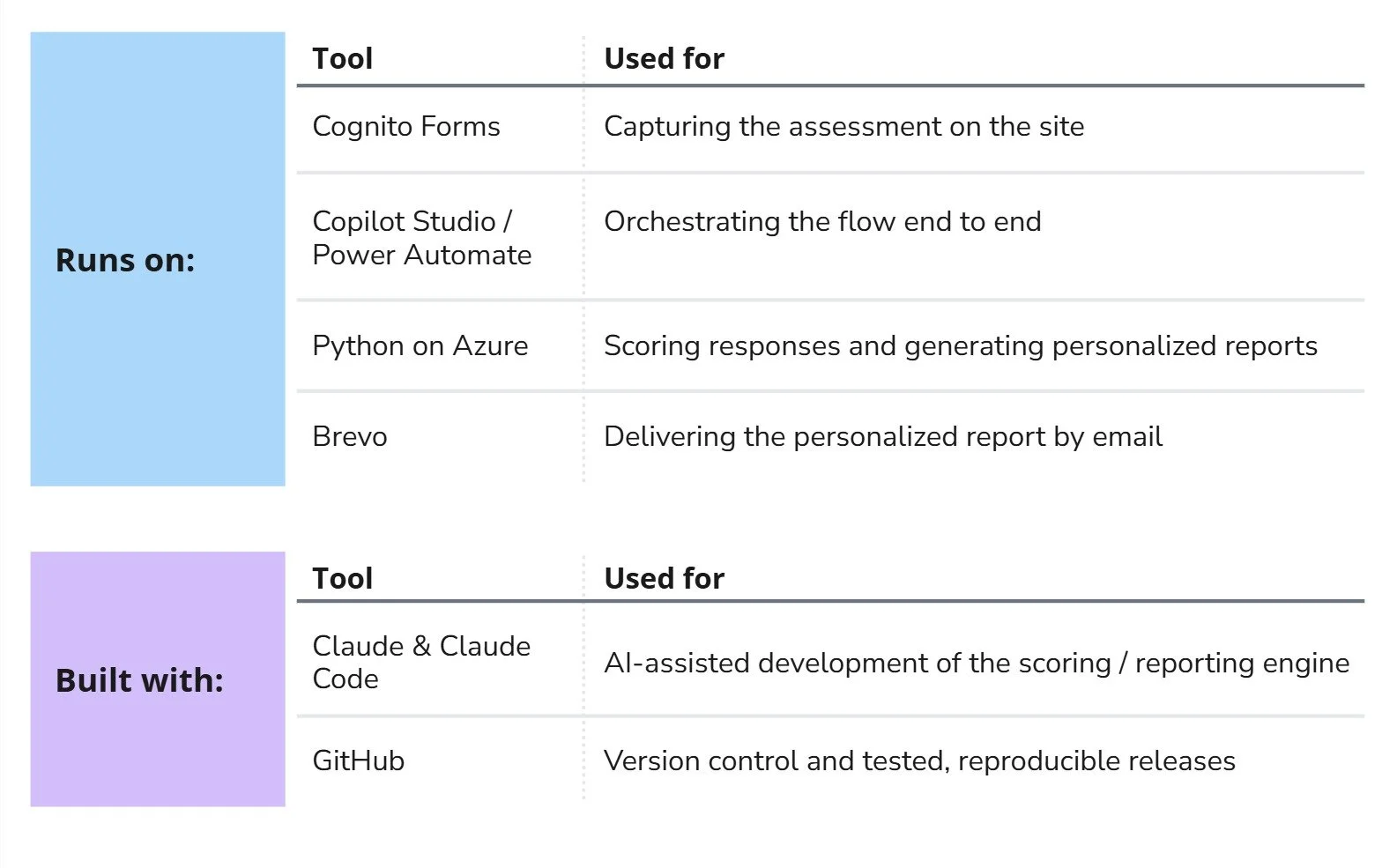
Copilot Studio was the right fit for orchestration — the same role our website assistant plays in the earlier builds we've written about. Python handles the scoring and report generation. Cognito handles the form.
Claude and Claude Code helped with development, with the work human-gated throughout. None of it was on autopilot.
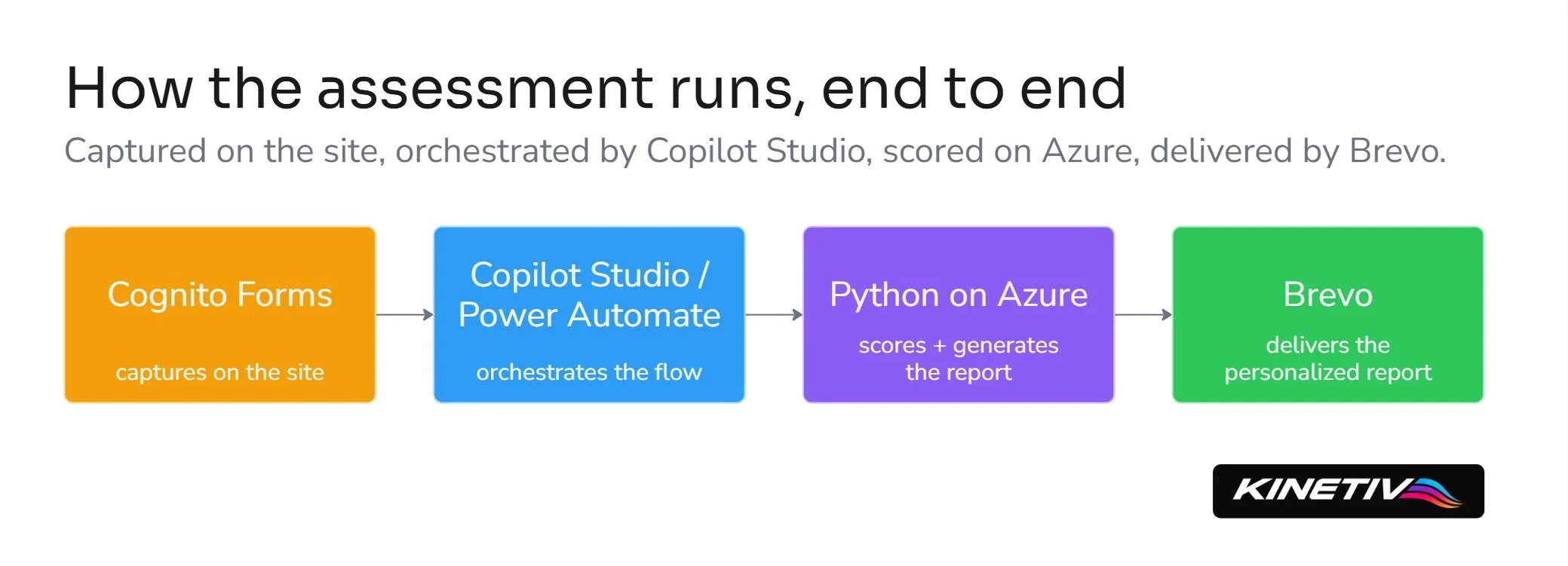
Solution architecture flow: Cognito Forms captures the assessment, Copilot Studio orchestrates it, Python on Azure scores and generates the report, and Brevo delivers it by email.
Where to go from here
Run the assessment. It's free, it takes a few minutes, and the report is yours to keep and take to your team.
If you want a deeper read, there are two ways to go further:
Extended — bring in more of your leadership for a broader, whole-organization view.
Tailored — reshape the assessment around your specific functions, services, and operating model.
Run the AI Opportunity Assessment or book time with us to go deeper.